Mastering the Modern Trifold Brochure: A Designer's Guide
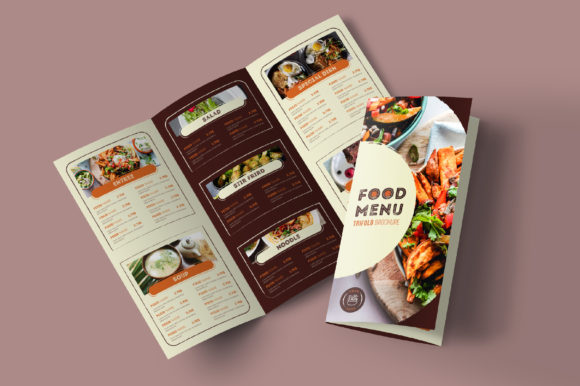
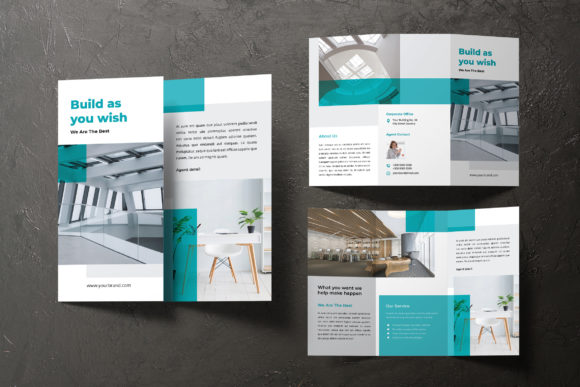
When you hold a well-designed trifold brochure, you feel its purpose immediately. It’s not just a piece of paper; it’s a portable brand story, a menu, a product showcase, or an event invitation folded into a compact, elegant format. The modern trifold brochure template I work with is built for this exact feeling—clean, professional, and adaptable. It’s designed in Adobe InDesign, sized perfectly for both A4 and US Letter, and comes with a layout that balances white space and content so naturally that it guides the reader’s eye from panel to panel without confusion. The visual personality here is one of confidence and clarity. It avoids trendy decorations that date quickly, instead relying on a strong grid, thoughtful typography, and a modern color palette to create that "wow" factor. This isn't about being loud; it's about being effective.
Where This Trifold Brochure Truly Shines
Think about the last time you needed to communicate something important but tangible. For a small business owner, it might be a new service offering. For an event planner, it’s the schedule for a weekend festival. For a marketer, it’s a product launch. This trifold brochure fits all these scenarios because its design is a neutral yet sophisticated canvas. The clean and modern layout doesn’t impose a specific style; instead, it enhances your content. The 300 DPI, CMYK format ensures that what you see on screen is what you get when it comes back from the printer—crisp, vibrant, and ready for professional use. The 3mm bleed is a detail that separates amateur prints from professional ones, allowing your backgrounds and images to extend seamlessly to the edge of the paper.
Practical Applications Across Industries
For a creative agency, this template becomes a cornerstone for client presentations. The two-page spread in the InDesign file gives you ample room to showcase case studies, team bios, and service lists without feeling cramped. Entrepreneurs and bloggers find it invaluable for creating media kits or workshop guides. The structure naturally supports a narrative: introduce a problem on the front panel, elaborate on your solution inside, and provide a clear call-to-action and contact details on the back. Because it’s fully editable, you can swap out the placeholder text and images for your own in minutes, but the underlying professional design framework remains, ensuring consistency across all your marketing materials.
The Role of Typography in Your Brochure's Impact
A brochure's design is only as good as its readability. This is where the choice of typeface becomes critical. The template is set up with a modern typography system that prioritizes hierarchy and flow. You might pair a clean sans serif font for body copy with a more distinct serif font or even a subtle script font for headings to add personality. The key is contrast and consistency. A well-chosen font pairing directs the reader subconsciously—it tells them what to read first, what’s a supporting detail, and what’s a key takeaway. For example, using a bold, geometric sans serif for your section titles establishes a strong, contemporary brand identity, while a lighter weight for the paragraphs keeps the content approachable and easy to scan.
Making Smart Design Choices
When customizing your trifold brochure, consider your audience. If you’re designing for a corporate event, stick to fonts that convey authority and trust. For a local bakery or a craft fair, you might incorporate a handwritten font or a more playful script to evoke warmth and creativity. Always test your font pairings at the actual print size. What looks good on a 27-inch monitor can become illegible when shrunk to a 7-inch panel. Check the tracking and leading—adequate spacing between letters and lines is non-negotiable for readability in print. The included layers in the InDesign file are neatly organized, so you can easily adjust these settings without disrupting the entire layout.
From Digital File to Tangible Asset
The final step is bridging the gap between your digital design and a physical object. This trifold brochure template is print-ready, but your file preparation matters. Ensure all your images are high-resolution (300 DPI is the standard). Double-check that your color mode is CMYK, not RGB, to avoid disappointing color shifts. When you export your final PDF, include crop marks and bleed. This is the professional standard that your printer expects. The result is more than just a brochure; it’s a tangible piece of your brand identity that people can hold, share, and refer back to. It builds recognition and reinforces your professionalism in a way that digital-only marketing often can’t.
Final Thoughts on Utility and Value
Ultimately, a good trifold brochure is a versatile tool in your design assets toolkit. It’s perfect for direct mail, point-of-sale displays, welcome packets, or press kits. Its strength lies in its structured flexibility—the template gives you a proven framework, but the content, images, and final tweaks are yours to define. By focusing on clear visual hierarchy, readable typography, and professional print specifications, you transform a simple template into a powerful communication piece. Whether you’re a designer building a portfolio, a small business launching a new product, or a marketer promoting an event, this approach ensures your message isn’t just seen, but remembered.